<?xml version="1.0" encoding="utf-8"?><feed xmlns="http://www.w3.org/2005/Atom" xml:lang="en"><generator uri="https://jekyllrb.com/" version="4.2.2">Jekyll</generator><link href="https://blog.ralex.fr/feed.xml" rel="self" type="application/atom+xml" /><link href="https://blog.ralex.fr/" rel="alternate" type="text/html" hreflang="en" /><updated>2026-05-19T23:22:26-05:00</updated><id>https://blog.ralex.fr/feed.xml</id><title type="html">Another empty blog</title><subtitle>A blog about Tech, learning new stuff and more by Ralex (Alexandre Amor).</subtitle><author><name>Ralex</name><email>contact@ralex.fr</email></author><entry><title type="html">Using Logseq everyday</title><link href="https://blog.ralex.fr/2023/12/29/using-logseq-everyday" rel="alternate" type="text/html" title="Using Logseq everyday" /><published>2023-12-29T09:00:00-06:00</published><updated>2023-12-29T09:00:00-06:00</updated><id>https://blog.ralex.fr/2023/12/29/using-logseq-everyday</id><content type="html" xml:base="https://blog.ralex.fr/2023/12/29/using-logseq-everyday"><![CDATA[<p>I’ve discovered Logseq months ago and started using it to take notes every days.</p>

<p>It turns out it is an awesome tool to organize your ideas and constitute a knowledge base.</p>

<p>It is focused on privacy by allowing user to store data locally and it is <a href="https://github.com/logseq/logseq">open sourced</a>.</p>

<p>There is probably a lot of different usage to make with this tool, based on your personal goals and what it is used for.</p>

<p>Here are some features I found useful and some way of using Logseq.</p>

<h2 id="everyday-log">Everyday Log</h2>

<p>My first usage is to write down every ideas or important notes in a log (yeah, that’s probably why it’s named that way).</p>

<p>When a subject become important, you probably want to have a page related to this subject.</p>

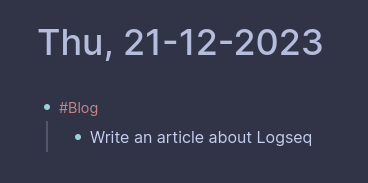
<p>In Logseq you can create a new page by using <code class="language-plaintext highlighter-rouge">#&lt;page name&gt;</code> in you log, it will make a linked reference to this page.</p>

<p><img src="/assets/images/logseq-1.png" alt="Logseq log" /></p>

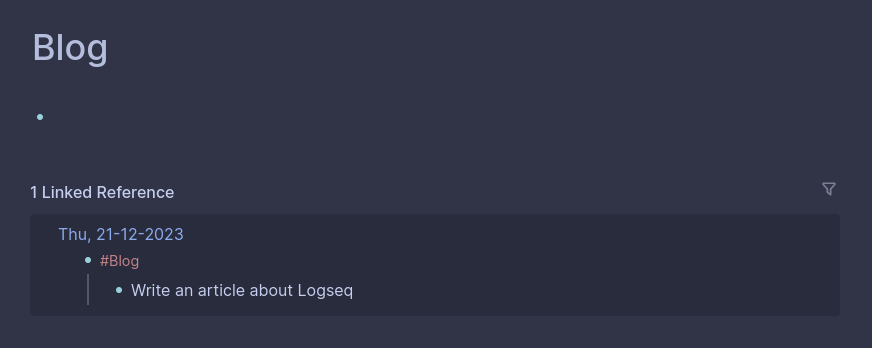
<p>The informations written bellow <code class="language-plaintext highlighter-rouge">#Blog</code> will be available at the bottom of the page.
You can gather informations during your journey and compile it later in a page assembling informations on the same subject.</p>

<p><img src="/assets/images/logseq-2.png" alt="Logseq page" /></p>

<h2 id="using-todo-list">Using todo list</h2>

<p>Whith a simple <code class="language-plaintext highlighter-rouge">/</code>, it is possible to acces builtin commands.</p>

<p>One of them is <code class="language-plaintext highlighter-rouge">TODO</code> that can add a checkbox on an item. It’s status can be changed by clicking to “DOING”, “LATER” or “DONE”.</p>

<h2 id="some-useful-plugins">Some useful plugins</h2>

<p>Here is a quick list of plugins I find really helpful:</p>
<ul>
  <li>
    <p>Bullet Threading: Add bullet threading to your active blocks</p>
  </li>
  <li>
    <p>Emoji Picker: A plugin that lets you pick emoji</p>
  </li>
  <li>
    <p>Journals calendar: A simple journals calendar</p>
  </li>
  <li>
    <p>Daily TODO: Moves unfinished TODO tasks to new daily journals</p>
  </li>
  <li>
    <p>Todo list: Show your all TODO items and easy to add new items on your today’s journal page</p>
  </li>
</ul>

<h2 id="conclusion">Conclusion</h2>

<p>There is a lot of thing to share about Logseq, I will probably write more on this subject in the future.</p>]]></content><author><name>Ralex</name><email>contact@ralex.fr</email></author><category term="logseq" /><summary type="html"><![CDATA[I’ve discovered Logseq months ago and started using it to take notes every days.]]></summary></entry><entry><title type="html">How to serve this blog?</title><link href="https://blog.ralex.fr/2023/12/21/how-to-serve-this-blog" rel="alternate" type="text/html" title="How to serve this blog?" /><published>2023-12-21T14:45:00-06:00</published><updated>2023-12-21T14:45:00-06:00</updated><id>https://blog.ralex.fr/2023/12/21/how-to-serve-this-blog</id><content type="html" xml:base="https://blog.ralex.fr/2023/12/21/how-to-serve-this-blog"><![CDATA[<p>I wanted something simple to avoid loosing time in configuring and customizing this blog.
I just have to focus on writing some new stuff to share 🙂</p>

<p>The backend is a simple docker compose with 2 services:</p>
<ul>
  <li><code class="language-plaintext highlighter-rouge">blog</code> to serve static content with Nginx</li>
  <li><code class="language-plaintext highlighter-rouge">blog-build</code> as a “sidecar” container constantly watch for updates in blog/ directory and generate static content</li>
</ul>

<p>This is <code class="language-plaintext highlighter-rouge">docker-compose.yml</code> content:</p>
<div class="language-yaml highlighter-rouge"><div class="highlight"><pre class="highlight"><code><span class="na">version</span><span class="pi">:</span> <span class="s2">"</span><span class="s">3.9"</span>

<span class="na">services</span><span class="pi">:</span>
  <span class="na">blog</span><span class="pi">:</span>
    <span class="na">container_name</span><span class="pi">:</span> <span class="s">blog</span>
    <span class="na">image</span><span class="pi">:</span> <span class="s">nginx</span>
    <span class="na">volumes</span><span class="pi">:</span>
      <span class="pi">-</span> <span class="s">/srv/docker-compose/blog/_site/:/var/www/html</span>
      <span class="pi">-</span> <span class="s">/srv/docker-compose/nginx.conf.template:/etc/nginx/templates/nginx.conf.template</span>
    <span class="na">ports</span><span class="pi">:</span>
     <span class="pi">-</span> <span class="s2">"</span><span class="s">8001:8001"</span>
    <span class="na">environment</span><span class="pi">:</span>
      <span class="na">NGINX_HOST</span><span class="pi">:</span> <span class="s">blog.ralex.fr</span>
      <span class="na">NGINX_PORT</span><span class="pi">:</span> <span class="m">8001</span>
    <span class="na">restart</span><span class="pi">:</span> <span class="s">always</span>

  <span class="na">blog-build</span><span class="pi">:</span>
    <span class="na">container_name</span><span class="pi">:</span> <span class="s">blog-build</span>
    <span class="na">image</span><span class="pi">:</span> <span class="s">jekyll/jekyll:latest</span>
    <span class="na">entrypoint</span><span class="pi">:</span> <span class="s">jekyll</span>
    <span class="na">command</span><span class="pi">:</span> <span class="s">build --watch --incremental</span>
    <span class="na">environment</span><span class="pi">:</span>
      <span class="na">JEKYLL_ROOTLESS</span><span class="pi">:</span> <span class="s">1</span> 
    <span class="na">volumes</span><span class="pi">:</span>
      <span class="pi">-</span> <span class="s">/srv/docker-compose/blog:/srv/jekyll</span>
    <span class="na">restart</span><span class="pi">:</span> <span class="s">always</span>
</code></pre></div></div>

<p>There is a special feature of the official Nginx docker image that is used to customize hostname and port with <code class="language-plaintext highlighter-rouge">nginx.conf.template</code> file:</p>
<div class="language-plaintext highlighter-rouge"><div class="highlight"><pre class="highlight"><code>server {
    listen       ${NGINX_PORT};
    server_name  ${NGINX_HOST};
    root /var/www/html;

    location / {
        try_files $uri $uri/ $uri.html =404;
    }
}
</code></pre></div></div>
<p>You can read more about it <a href="https://github.com/docker-library/docs/tree/master/nginx#using-environment-variables-in-nginx-configuration-new-in-119">here</a>.</p>

<p>Any modification to <code class="language-plaintext highlighter-rouge">_config.yml</code> will need a restart with:</p>
<div class="language-bash highlighter-rouge"><div class="highlight"><pre class="highlight"><code>docker-compose restart blog-build
</code></pre></div></div>

<p>But any addition to _posts/ directory will be automatically published.
It is a good idea to put <code class="language-plaintext highlighter-rouge">published: false</code> in the header of a new article while it is not yet available for public reading.</p>

<p>Another way is to put a date in the future in the header of your article.
You will see this kind of message in your logs until the post is ready to be published:</p>
<div class="language-plaintext highlighter-rouge"><div class="highlight"><pre class="highlight"><code>Skipping: _posts/2023-12-21-how-to-serve-this-blog.md has a future date
</code></pre></div></div>

<p>Then, it’s up to you to choose to version this code in Git or, at least, back it up! 😉</p>]]></content><author><name>Ralex</name><email>contact@ralex.fr</email></author><category term="jekyll" /><category term="blog" /><summary type="html"><![CDATA[I wanted something simple to avoid loosing time in configuring and customizing this blog. I just have to focus on writing some new stuff to share 🙂]]></summary></entry></feed>